
Version: 2.0.79
Release Date: 1/19/2023
Highlights
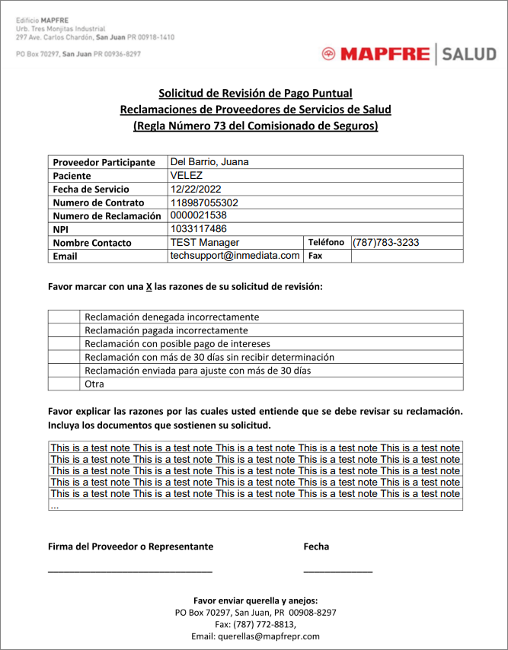
- New Mapfre Commercial dispute form added in Payer Payments section.
- Improvements have been made to the EMR Auto Conversion process to better allow tracking of work completed after the Autoprocessor creates the initial claim.
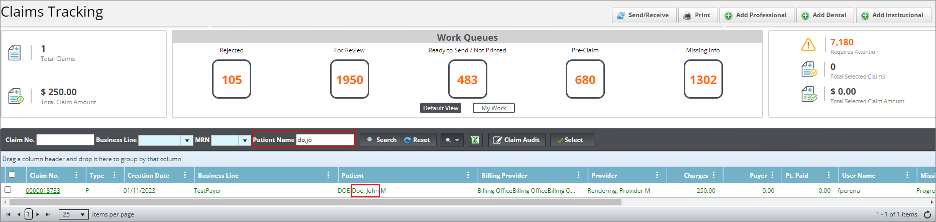
- Improved patient search functionality was added to the Claims Tracking module. Now you can make search queries by using the last names and first names at the same time.
- Note: It is recommended to regularly clean or clear the browser cache. This will improve performance. It also helps to download any pending version files.
Improvements
Claims
- When the EMR Auto Conversion process was implemented, claims completed through this process were assigned to the Autoprocessor, but subsequent work performed by an actual user was being assigned to Autoprocessor rather than the user. We have updated the system so that work completed on the claim after the auto-conversion process will now behave as it did before the Autoprocessor update.
Claims Tracking
- Searching for a patient in Claims Tracking has been upgraded. You can search for patients by their last names and first names at the same time by separating them by a comma (,). The search also allows you to use partial last name and first name searches, for example: Doe, John can be searched as Do, Jo which allows you to get the best results.
Payer Payments
- A new dispute form has been added. This is the Mapfre Commercial Dispute form: Solicitud de Revisión de Pago Puntual Reclamaciones de Proveedores de Salud (Regla Número 73 de Comisionado de Seguros).
Bug Fixes
Claims
- Fixed an issue occurring in the Firefox browser causing a 500 error when adding a claim from an inactivated plan.
Payer Payments
- When electronic payments are converted to manual, a non-functional “Not Found” hyperlink was displaying in the Match Claim Column. This has been removed.
Claims Tracking
- Fixed an issue where the Duplicate Claim option was copying over the previous claim’s ICN.
- Fixed an issue in Claims Tracking when the My Work Queue filter is applied. Previously when this filter was applied, attempting to print claims caused an “Please select a Claim for print.” alert message.
- Fixed an issue where the Missing Info Alerts where not triggered properly when the user selected them manually.
EMR Encounter
- Corrected an error that occasionally caused the Claim Save Options window not to show after an EMR Encounter had been converted to a claim.
For assistance or additional information, please contact us through our chat service on;
portal.inmediata.com/chat or via email at cs@inmediata.com.
We are here to serve you!