
Version: 2.0.96
Release Date: 3/14/24
Highlights
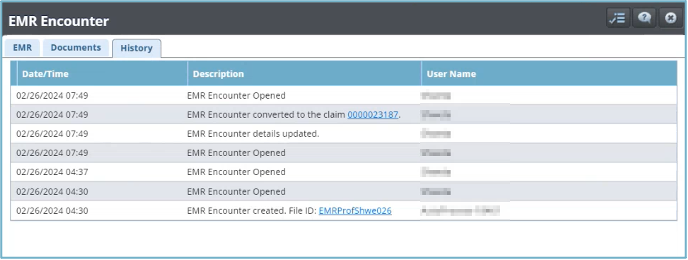
- Several improvements to functionality related to EMR Encounter conversion have been made, including better record history of encounter to claim auto-conversion in patient history, and improved additional data mapping from encounters to claims.
- Note: It is recommended to regularly clean or clear the browser cache. This will improve performance. It also helps to download any pending version files.
Improvements
Documents Tab
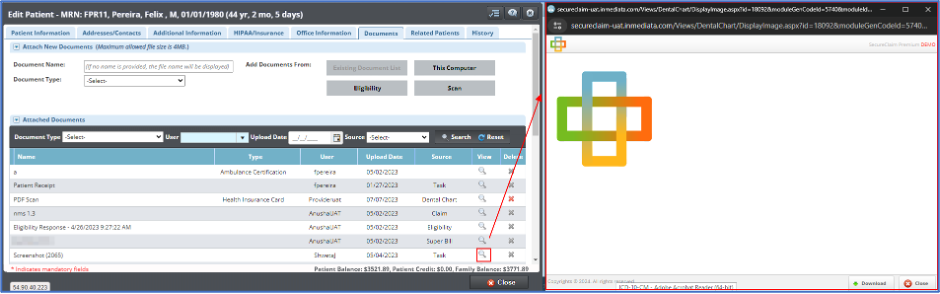
- Documents now open in a preview window without being downloaded automatically. This allows users to see and review documents without having to download them. A download icon has been added which allows users to still download the document if they wish, see image below.
EMR Encounters
- Enhanced functionality now allows for reading and identifying Service Facility and Billing Provider information from EMR encounter data to claim/pre-claim.
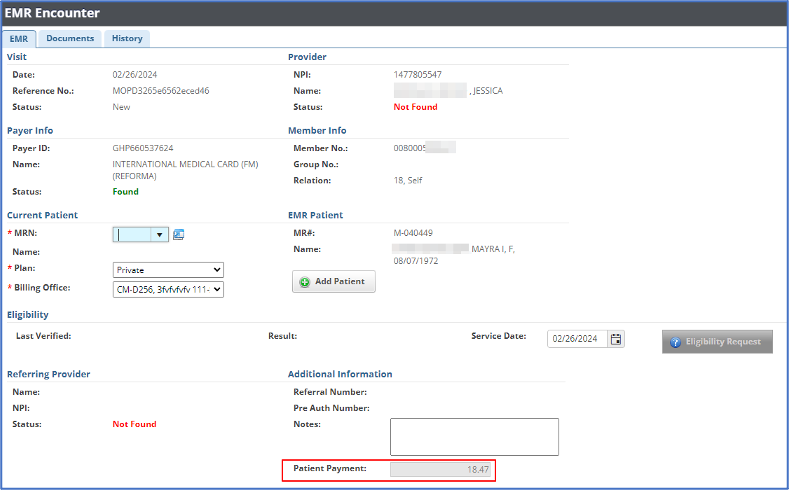
- Added the ability to read the patient payment data from EMR Encounters. The Patient Payment field is now available in the Additional Information section of the EMR Encounter record below the Notes section.
EMR Auto-conversion
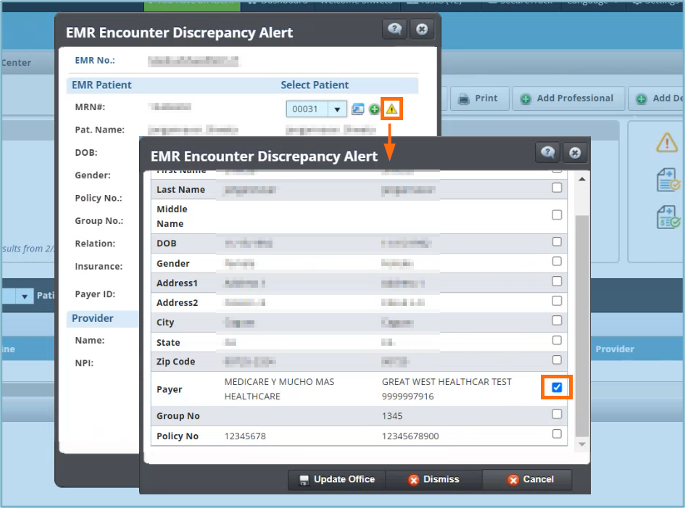
- The EMR Encounter Discrepancy Alert has been updated to better indicate patient changes. This alert helps you to see when auto-converted encounters have matched with existing patient profiles, but there are discrepancies between the file data and the new encounter data, such as updated payer information. This allows users to notice changes or update in patient information, such as a change in insurance provider or plan.
Patient Payments
- Improvements in the HL7 conversion process have enabled the display of patient payment details. Recorded payments from encounters are now viewable in the Super Bill/EMR Encounter field when creating a patient payment from converted claim. This feature allows users to verify if a patient payment was captured in the HL7 encounter.

Patient Record
- Patient Records now show all encounters auto-converted to claims/pre-claims to allow users to see better details about claim and auto-conversion history. You can find this information by going to Patient Record > History > EMR Encounters.
Bug Fixes
Restorative Dental Chart
- Resolved an issue where claim numbers would not display after selecting service lines and choosing the “Bill Selected” option to generate a claim.
For assistance or additional information, please contact us through our chat service on;
portal.inmediata.com/chat or via email at cs@inmediata.com.
We are here to serve you!